Free Password Generator
Make a strong, random password in one tap. Everything happens in your browser, so your password is never saved or sent anywhere.
Updated October 2026
How to use the password generator (with screenshots)
These are real screenshots of this page, step by step.
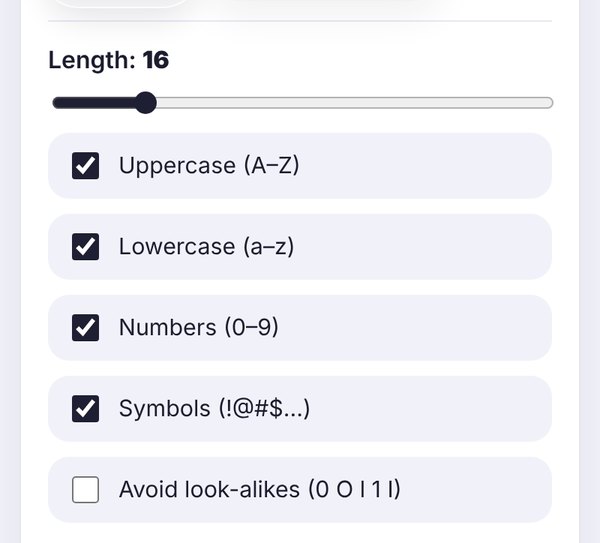
Move the slider to pick how long your password should be. 16 characters is a good default. Untick any character type a website doesn't allow.
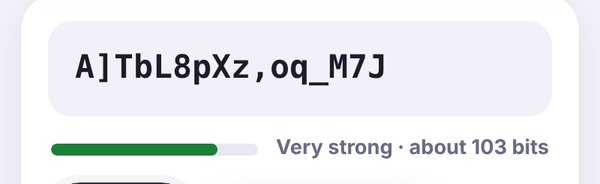
The bar shows how hard the password is to guess, from Weak to Very strong. Longer passwords with more character types score higher.

Tap Copy and paste it where you need it. Then save it in a password manager, because you won't remember a random password, and that's the point.
Why use a random password?
Most hacked accounts don't get "hacked" in a clever way. Someone simply guesses the password, or uses one that leaked from another website. Passwords like your pet's name plus a year, or the same password on every site, make that easy.
A random password fixes both problems. It has no pattern a person or a computer can guess, and if you make a new one for every account, one leak can't unlock everything else. This tool makes those random passwords for you in a second.
Is it safe to use an online password generator?
That's a fair question, and the honest answer is: it depends on how the generator works. This one runs entirely inside your browser. The password is created on your own device with your browser's built-in secure random number generator (the Web Crypto API, the same kind of randomness used for encryption). Nothing is sent to our server, nothing is saved, and the password disappears as soon as you close or refresh the page.
If you want to be extra careful, you can even load this page, turn off your internet, and generate passwords offline. It will still work.
What makes a password strong?
Length matters most. Every extra character makes a password many times harder to guess. A 16-character random password is far stronger than an 8-character one, even if the short one has symbols.
Variety helps. Mixing uppercase, lowercase, numbers and symbols gives each character more possibilities, which adds up quickly.
Randomness is everything. "Summer2026!" ticks every box but is easy to guess, because it follows a pattern people use all the time. A random password has no pattern at all.
The strength meter on this page estimates this as "bits of entropy". Under about 40 bits is weak, 60 bits is decent, and 80 bits or more is very strong for everyday accounts.
Tips for keeping your accounts safe
- Use a different password for every account. This is the single most important habit.
- Use a password manager. It remembers your passwords so you don't have to. Most phones and browsers have one built in.
- Turn on two-factor authentication for email, banking and social media. Even if your password leaks, a second step keeps people out.
- Never share your password in a chat or email, even with someone who says they're from support.
- Change a password right away if a site tells you it was involved in a data breach.
When to tick "Avoid look-alikes"
Characters like 0 and O, or l, 1 and I, look almost the same in many fonts. If you ever need to read a password out loud or type it from paper, tick this option to leave them out. It makes the password slightly weaker, so add a couple of extra characters to make up for it.
Some websites reject symbols
A few websites only allow certain symbols, or none at all. If your password is rejected, untick Symbols and increase the length a little instead. Length makes up for it.
Looking for something more fun? Our font generator and cool symbols are made for stylish names, bios and gaming tags. Just don't use fancy letters in a password, because some sites won't accept them and you may not be able to type them again.
Frequently asked questions
Is this password generator safe?
Yes. Passwords are created on your device with your browser's secure random number generator. Nothing is sent to our server or saved, and the password is gone when you close the page.
How long should my password be?
At least 12 characters, and 16 or more is better. For important accounts like email and banking, longer is always safer.
Should I include symbols?
If the website allows them, yes. Symbols add variety and make the password stronger. If a site rejects them, untick Symbols and make the password a bit longer instead.
Can someone see the passwords I generate?
No. The tool runs only in your browser. We never receive, store or log the passwords it creates.
How do I remember a random password?
You don't have to. Save it in a password manager, like the one built into your phone or browser. That way every account can have its own strong password.
Is the password generator free?
Completely free, with no sign-up and no limits.