Free Bold Text Generator
Free bold text generator and bold letters generator: type your text, tap Copy and paste bold text into your Instagram bio, Facebook, LinkedIn and more.
Updated October 2026
These styles are Unicode characters, so they keep their look when you paste them. Only English letters (A–Z) and numbers are converted. These styles do not work on Hindi (Devanagari) text.
How to use the bold text generator (with screenshots)
These are real screenshots of this page, step by step.
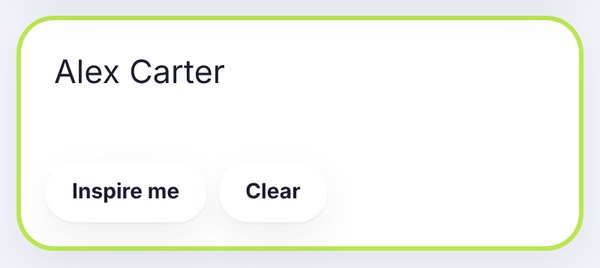
Tap the box at the top of the page and type your name, bio line or caption. In this example we typed Alex Carter. Use Clear to empty the box, or Inspire me for a random example.
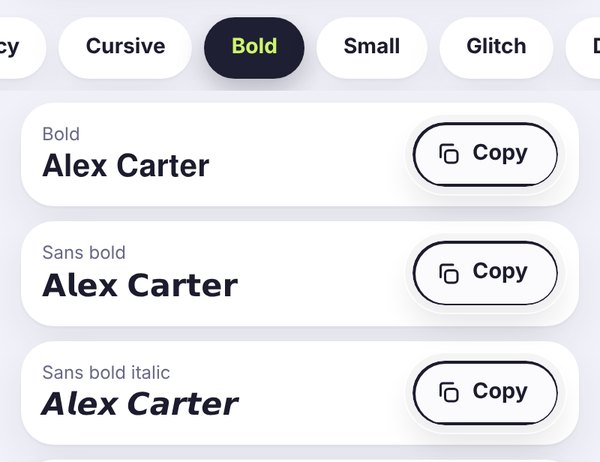
The Bold tab opens automatically on this page. You will see Bold (serif), Sans bold and Sans bold italic. Scroll the tabs to see more categories, such as Cursive or Small.
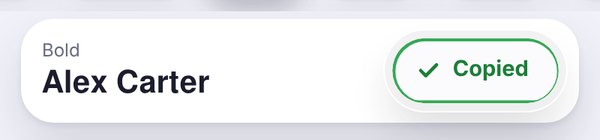
Tap the Copy button next to the style you like. The button turns green and says Copied, which means the bold text is now on your clipboard.
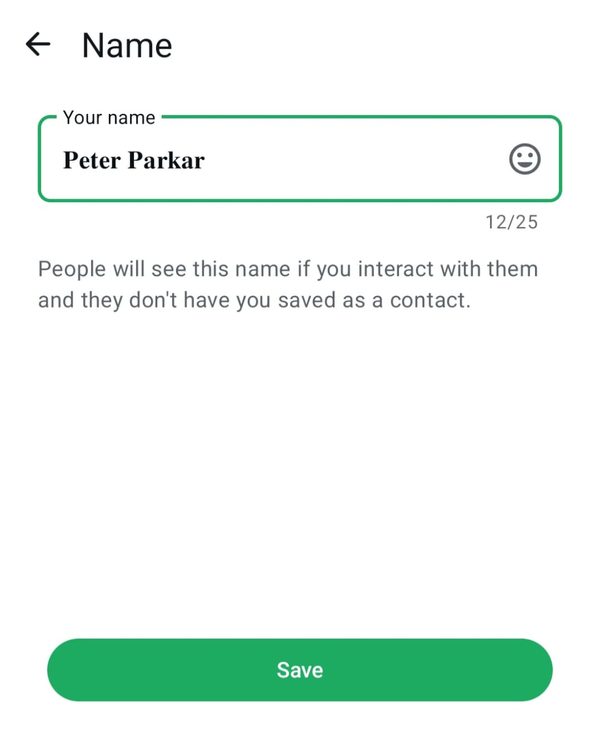
Open Instagram, WhatsApp, Facebook, LinkedIn or any other app and paste the text where you want it. This real screenshot shows a bold name pasted in the WhatsApp Name screen.
What is a bold text generator?
A bold text generator is a free online tool that turns normal letters into bold letters. Type your words in the box above, and you instantly see them in many bold styles. Tap Copy, then paste the result into any app. This is the easiest way to get bold text where there is no bold button, for example in an Instagram bio, a WhatsApp status, a Discord name or a YouTube comment.
People search for this tool in many ways: bold font generator, bold generator, bold writing generator, bold letter generator or simply bold text copy and paste. All of these mean the same thing, and FilesSnap covers them in one place. There is nothing to install and no account to create.
Bold letters generator and bold text copy paste
This page works as a bold generator, a bold letters generator and a bold font generator at the same time. Type a name, a headline or a short bio line, and every bold style appears at once. Tap Copy, then paste your bold text into an Instagram bio, a Facebook post, a LinkedIn headline, a WhatsApp status or a Discord name. Bold text copy paste works because each letter is a real Unicode character, so it does not need any font or app update.
How to make bold text in 3 steps
- Type your text. Write your name, caption, bio line or any short message in the box at the top of this page.
- Choose a bold style. The Bold tab shows all heavy styles. Compare the cards and pick the one you like.
- Copy and paste. Tap Copy, open your app and paste. The bold look comes with the text.
Bold styles you can use
Serif bold
Classic bold letters with small strokes at the ends. They look formal and strong, for example 𝐁𝐨𝐥𝐝 𝐭𝐞𝐱𝐭. A good choice for headlines and brand names.
Sans bold
Clean, modern and easy to read, such as 𝗕𝗼𝗹𝗱 𝘁𝗲𝘅𝘁. This is the safest bold font for bios, usernames and chats, because most apps and phones display it correctly.
Bold italic
Heavy and slanted, for example 𝑩𝒐𝒍𝒅 𝒊𝒕𝒂𝒍𝒊𝒄. It adds emphasis and movement to one short phrase.
Bold script and bold gothic
Decorative styles for a stylish or dramatic look, such as 𝓑𝓸𝓵𝓭 𝓼𝓬𝓻𝓲𝓹𝓽. Use them for short names and titles, because long text in these styles is harder to read.
Where you can use bold text
Instagram: use bold letters in your bio, name field, captions and comments to highlight a key word or your brand. See our guide on how to change the font on your Instagram bio.
WhatsApp: WhatsApp has its own bold formatting with asterisks, and you can also paste bold Unicode text into your About line, status and group names. Read more in fancy text for WhatsApp.
Discord, Telegram and games: bold text makes usernames and clan tags stand out. Check the rules of each game first, and see best fonts for gaming usernames.
Shops and creators: highlight product names, offers and headlines in posts and messages without opening a design app.
Bold keyboard: can you type in bold directly?
Phones do not have a built-in bold keyboard. Some keyboard apps add fancy fonts, but they can be slow and may ask for extra permissions. The simple and safe method is to use this page as your bold keyboard: type, copy and paste. It works on Android, iPhone, Windows and Mac, and it needs no download.
How Unicode bold text works
These letters aren't a font file. Unicode, the big list of characters every phone and computer uses, includes a block called Mathematical Alphanumeric Symbols. It was made for maths, but it happens to contain full bold alphabets: serif bold (𝐀𝐁𝐂), sans bold (𝗔𝗕𝗖), bold italic (𝑨𝑩𝑪) and bold digits (𝟏𝟐𝟑). A Unicode bold text generator simply swaps each normal letter for its bold twin, so the bold look travels with your text when you copy and paste it.
That's also the big difference from pressing Ctrl+B in a document. Ctrl+B keeps the same letters and only draws them thicker, so the bold disappears in apps without formatting. Unicode bold uses different characters, so it stays bold, but you can't switch it off with a button. You'd have to retype the text.
There are a few limits worth knowing. Unicode only has bold versions of English (Latin) letters, Greek letters and numbers, so Hindi and most other scripts stay normal. Search tools may not treat 𝐇𝐞𝐥𝐥𝐨 as the same word as Hello, and some screen readers read these letters one by one. Use Unicode bold for short highlights, and keep important words in plain text. For the full background, read what are Unicode fonts.
Tips for better bold text
- Bold only the most important words. If everything is bold, nothing stands out.
- Keep it short. Long bold paragraphs are tiring to read.
- Use plain text for phone numbers, emails and links, because bold characters may not be clickable or searchable.
- Screen readers may read styled letters oddly, so do not use bold text for important information.
- Test your text in the app before you publish it. If you see boxes, read why fonts show empty boxes.
More styles to try
Want a different look? Try the cursive font generator, the small caps generator, the cool fonts generator or the glitch and strikethrough text generator. You can also browse all styles on the free font generator home page.
Bold text generator for every platform
Pick the page that matches where you will post: Facebook bold text generator (also called FB bold text generator), Instagram bold text generator, LinkedIn bold text generator and the section above that explains how Unicode bold works. They all use the same tool, with tips written for each place.
Bold text Discord, Facebook and LinkedIn guide
FilesSnap is a simple online bold text generator: type once, copy any bold font and paste it where you need it. Most people use bold text in three places, so here is how each one works.
How to bold text in Discord. In Discord chat you do not need a generator. Put two asterisks on each side of your words, like **hello**, and Discord shows them in bold. Three asterisks, like ***hello***, give bold italic. This Markdown does not work in your display name or server nickname, so for a bold text Discord name, copy a style from this page and paste it into the name field.
Facebook. Normal Facebook posts and comments have no bold button. Our Facebook bold text generator page gives you bold letters that keep their look when you paste them.
LinkedIn. LinkedIn posts have no bold option either. Use LinkedIn bold text for a short headline or the first line of a post, and keep the rest in normal text so it stays easy to read and to search.
Frequently asked questions
Quick answers before you copy.
What is a bold text generator?
A bold text generator turns normal letters into bold letters that you can copy and paste. FilesSnap uses Unicode characters, so the bold look stays with the text in Instagram, WhatsApp, Discord, Facebook and LinkedIn.
How do I make bold text on Facebook or LinkedIn?
Type your text above, copy a bold style and paste it into your post, comment or bio. See our Facebook and LinkedIn bold text generator pages for tips.
What is the difference between a bold font generator and a bold letter generator?
They are the same idea with different names. People also search for bold writing generator, bold generator and bold text copy and paste, and all of them lead to this tool.
Is bold text safe to use for usernames?
Often yes, but each platform sets its own rules. Sans bold and Bold are the most widely accepted styles.
Why do I see empty boxes after pasting bold text?
The device or app does not have a symbol for that style. Choose Bold or Sans bold, or update your phone.
Can I type bold text with a keyboard?
A normal phone keyboard has no bold button. Type here, copy the bold version and paste it where you need it.
Does bold text work in Hindi?
No. The bold styles convert English letters (A to Z) and numbers only.
Is this bold text generator free?
Yes. It is free to use, with no sign-up and no watermark.
How do I bold text in Discord?
In Discord chat, put two asterisks on each side of your words, like **hello**, and Discord shows them in bold. Markdown does not work in display names or server nicknames, so for a bold Discord name, copy a bold style from this page and paste it into the name field.
What is a bold font?
A bold font is a thicker, heavier version of a typeface. The strokes of each letter are wider, so bold words stand out from the text around them. On this page, bold fonts are made with Unicode characters, so the bold look stays when you copy and paste it into apps that have no bold button.
How do I make fonts bold?
In a word processor or email app, select your text and press Ctrl+B (Cmd+B on a Mac) or tap the B button. In apps without a bold button, such as an Instagram bio, a Facebook post or a game name, type your text in the box on this page, tap Copy next to a bold style and paste it where you want it.