Why Do Fonts Show Empty Boxes and How to Fix It
Updated October 2026
You paste some fancy text, and instead of letters you get little empty squares. Annoying, but it's rarely a big deal, and the fix usually takes seconds.
What are those empty boxes?
They're placeholders. Every character you see on a screen has to be drawn by a font. When your phone or app runs into a character that none of its fonts can draw, it shows a stand-in instead, usually an empty box. People in the font world call these boxes tofu, because they look like little blocks of it.
Here's a real example from a browser that doesn't have one particular symbol:
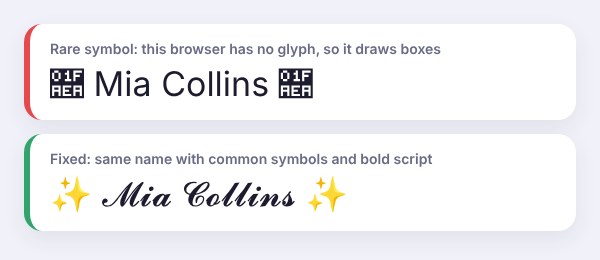
The important thing to understand is that the text itself isn't broken. The character is still there. Your device just doesn't know how to draw it.
Boxes vs question marks vs �
An empty box (or a box with tiny numbers inside) means the font is missing that character. That's what this guide is mostly about.
A diamond with a question mark (�) is different. It usually means the text got damaged along the way, for example when an app or website saved it in the wrong format. Re-copying from the original source normally fixes it.
Why it happens
An older phone or computer. New characters are added to Unicode regularly. If your system is a few years old, it may not have fonts for the newer ones.
The app uses its own font. Some apps, games and websites use a font with a smaller set of characters. Your phone might support a symbol, but the app doesn't.
The style is rare. Bold, italic and small caps are supported almost everywhere. Some square letters, very old-fashioned symbols and decorative marks fail much more often.
The text was changed on the way. Some forms, chat tools and game name fields strip out or replace unusual characters.
How to fix it
- Switch to a safer style. Bold, sans bold, italic and small caps work on nearly every device. You can find them all in the bold text generator and the small text generator.
- Swap rare symbols for common ones. Hearts, stars, sparkles and simple arrows are well supported.
- Update your phone or computer. System updates often add new fonts and symbols.
- Test before you post. Paste your text into a draft or send it to yourself first.
- Keep important stuff plain. Names, phone numbers, prices and addresses should always be in normal text.
On a computer, installing a font family that covers lots of characters, like Google's free Noto fonts, can also fill a lot of the gaps.
Why it looks fine for you but not for your friend
The same character can look different, or not show at all, depending on the device. An iPhone, an Android phone and a Windows laptop all use different fonts. So if you can see your fancy text but your friend sees boxes, it's their device that's missing the symbol, not your text that's wrong.
Will boxes hurt my account?
No. Boxes are only a display issue. Your Instagram, WhatsApp or TikTok account isn't affected, and the original characters are still saved in your text. Anyone with a device that supports them will see them correctly.
Which styles are the safest?
If you want your text to show up for as many people as possible, stick to bold, italic, bold italic and small caps. Cursive script is usually fine on modern phones. Gothic, double-struck and especially rare decorative symbols are the most likely to cause boxes on older devices.
Frequently asked questions
Why do I see boxes instead of letters?
Your device or app doesn't have a font that can draw those characters, so it shows a placeholder box instead. The text is still there, it just can't be displayed.
How do I fix fonts showing as boxes?
Try a more common style, like bold or small caps, and swap rare symbols for simple ones. Updating your phone or computer can also add the missing characters.
Why can I see my fancy text but my friend can't?
Different devices use different fonts. Your phone has the symbols, but theirs doesn't. Resending it in a safer style, like bold, usually solves it.
What does a question mark in a diamond mean?
That's the replacement character (�). It usually means the text was damaged when it was saved or sent. Copy it again from the original source.
Will empty boxes get my account flagged?
No. It's only a display issue. Nothing happens to your account.
Which fancy fonts work on every phone?
Nothing is guaranteed everywhere, but bold, italic and small caps come very close. They're the safest picks for bios, names and captions.