How to Change the Font on Your Instagram Bio
Updated October 2026
Instagram doesn't have a font setting, but plenty of profiles still have cursive names and bold bios. Here's how they do it, and how you can too, in about a minute.
Can you actually change the font on Instagram?
Not in the settings, no. Instagram always shows your bio, name and captions in its own font, and there's no menu to change it. What people do instead is paste in special Unicode characters that look like a different font, things like 𝓬𝓾𝓻𝓼𝓲𝓿𝓮, 𝐛𝐨𝐥𝐝 or sᴍᴀʟʟ ᴄᴀᴘs. Instagram treats them like any other text, so they show up exactly as you pasted them.
It sounds like a hack, but it's completely normal and very common. You're not breaking any rules, and it doesn't affect your account.
Step by step: change your bio font
We'll use the Instagram bio fonts page on FilesSnap, because it shows every style at once. These are real screenshots from that page.
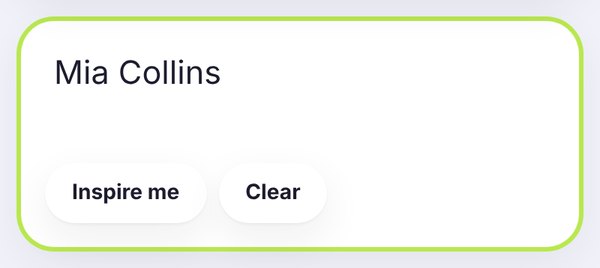
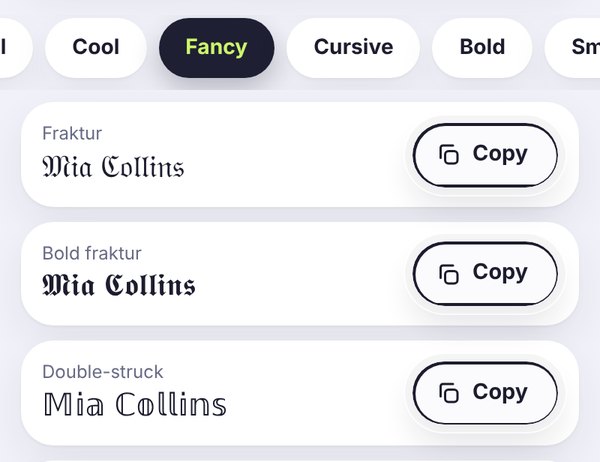
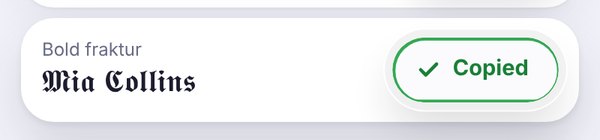
- Open Instagram and go to your profile.
- Tap Edit profile.
- Tap Name or Bio, paste your styled text and tap Done or Save.
- Go back to your profile and check how it looks. If something looks off, edit it again.
Where fancy fonts work (and where they don't)
Bio: yes. This is the most popular place for them.
Name field: yes, but think twice. Your name is used in Instagram search, and a fully styled name can be harder to find. Also, Instagram only lets you change your name twice within 14 days, so try it out before you commit.
Username (@handle): no. Usernames only accept letters, numbers, periods and underscores.
Captions, comments, DMs and highlight titles: yes. A styled first line in a caption is a nice way to stand out in the feed.
Stories: you can paste fancy text there too, but stories already have their own built-in fonts, so most people just use those.
Watch the 150-character limit
Your bio can be up to 150 characters. Styled letters usually count the same as normal ones, but extra decorations like sparkles, brackets and little symbols add up fast. A good habit is to write your bio in plain text first, check that it fits, and only then style it.
Which style should you pick?
Cursive (𝓗𝓮𝓵𝓵𝓸 𝓽𝓱𝓮𝓻𝓮) feels personal and warm. It suits lifestyle, beauty, wedding and creator accounts.
Bold (𝐎𝐩𝐞𝐧 𝐞𝐯𝐞𝐫𝐲 𝐝𝐚𝐲) is easy to read and feels confident. It's the go-to for shops and businesses.
Small caps (ᴄʟᴇᴀɴ ᴀɴᴅ sɪᴍᴘʟᴇ) looks minimal and modern. Photographers and designers love it.
Gothic (𝕹𝖎𝖌𝖍𝖙 𝕺𝖜𝖑) is dramatic. It works for gaming, music and darker aesthetics, but it's harder to read, so keep it to a word or two.
Mistakes that make a bio look messy
- Styling every line. One or two styled lines look designed. Five look chaotic.
- Mixing too many styles. Stick to two at most, for example a cursive name and a small caps tagline.
- Styling your contact details. Keep your email, phone number and city in normal text, so people and search can read them.
- Using rare symbols. Some show up as empty boxes on other phones. Our guide on why fonts show empty boxes explains why.
A simple bio formula
If you're stuck, try this: a styled name or headline on the first line, one plain line about what you do, and a short call to action at the end. For example:
𝓜𝓲𝓪 𝓒𝓸𝓵𝓵𝓲𝓷𝓼 ✨ baker & coffee addict, based in Austin new recipe every Sunday ➜
Then open your profile on your own phone, and ideally on a friend's phone too, just to make sure everything shows up properly.
Frequently asked questions
Can I change my Instagram font without an app?
Yes. You don't need to install anything. Just use a website like FilesSnap, copy the styled text and paste it into Instagram.
Is it safe to use fancy fonts on Instagram?
Yes. They're just Unicode characters, the same kind of characters as emoji. Using them won't get your account flagged or banned.
Why does my bio look different on my friend's phone?
Every phone draws these characters with its own system font, so the shapes can look slightly different. If your friend sees empty boxes, their phone doesn't support that style. Bold and small caps are the safest choices.
Can I use a fancy font in my Instagram username?
No. The @username only allows letters, numbers, periods and underscores. You can style your Name field and your bio instead.
Do fancy letters count toward the 150 characters?
Yes. They count just like normal letters, and decorations like sparkles and brackets count too. Write your bio first, then style it, so it still fits.
Is FilesSnap free?
Completely free, with no sign-up and no watermark. Your text stays in your browser.