Free Italic Text Generator
Turn your words into slanted italic letters, serif, sans or bold, and copy them anywhere.
Updated October 2026
These styles are Unicode characters, so they keep their look when you paste them. Only English letters (A–Z) and numbers are converted. These styles do not work on Hindi (Devanagari) text.
How to make italic text (with screenshots)
These are real screenshots of this page, step by step.
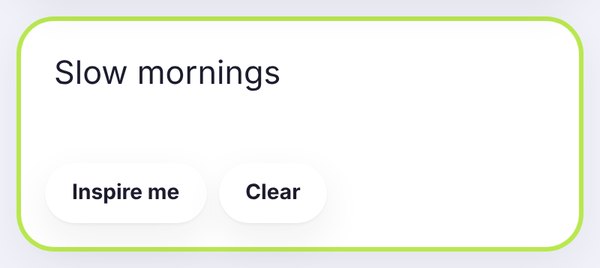
Write the words you want in italic. We typed Slow mornings, the kind of soft line that suits italic.
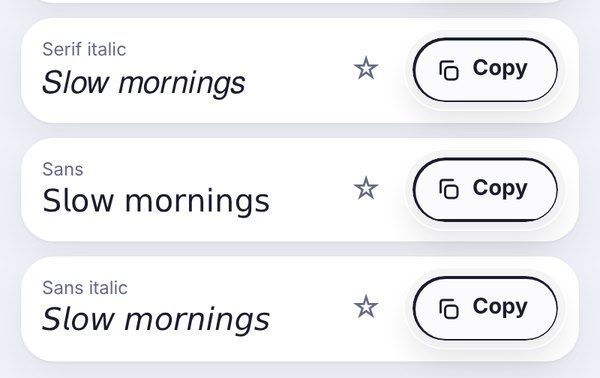
The italic styles are in the Fancy tab: Serif italic looks like a book, Sans italic is clean and modern. Bold italic versions are in the Cursive and Bold tabs.
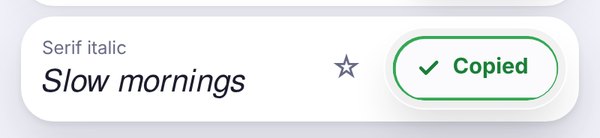
Tap Copy, wait for the green Copied button, then paste your italic text wherever you want it.
Italic text, without an italic button
Italic letters lean to the right, and they change the tone of a sentence. They can sound softer, more personal, or simply add a little emphasis. The trouble is that most places you write online, like an Instagram bio, a TikTok caption or an X post, don't have an italic button.
This italic text generator solves that. It swaps your letters for Unicode italic characters, like 𝘵𝘩𝘦𝘴𝘦, which stay slanted wherever you paste them.
The italic styles
Serif italic looks like the italics in a printed book: 𝑆𝑒𝑟𝑖𝑓 𝑖𝑡𝑎𝑙𝑖𝑐. It feels classic and a little elegant.
Sans italic is clean and modern: 𝘚𝘢𝘯𝘴 𝘪𝘵𝘢𝘭𝘪𝘤. It's the easiest italic to read on a phone.
Bold italic adds weight: 𝑩𝒐𝒍𝒅 𝒊𝒕𝒂𝒍𝒊𝒄. Use it when you want emphasis and energy at the same time. There's also a sans version in the bold text generator.
Where italic text works well
Quotes and lyrics-style captions: a short italic line under a photo feels thoughtful and personal.
Bios: an italic tagline under a bold name is a classic combination. See our Instagram bio fonts for more ideas.
Book, film and song titles: italics are the traditional way to write titles.
Gentle emphasis: italic stresses a word without shouting the way bold does.
Italic on WhatsApp, Discord and Facebook
Some apps have their own italic formatting. On WhatsApp, wrap a word in underscores, like _hello_. On Discord, use one asterisk on each side, like *hello*. That's the best option inside those chats. Use the Unicode italic from this page for places where formatting doesn't work, like your profile name, About line or a Facebook post. Our fancy text for WhatsApp guide explains both methods.
A few tips
- Keep italic text short. A whole paragraph in italic is tiring to read.
- Mix it with normal text for contrast, for example a normal sentence with one italic phrase.
- Keep links, emails and phone numbers in normal text so people can tap and copy them.
- If someone sees boxes instead of letters, their device doesn't support the style. Sans italic is the most widely supported.
Frequently asked questions
How do I make italic text?
Type your text in the box at the top of this page, open the Fancy tab and tap Copy next to Serif italic or Sans italic. Then paste it anywhere.
Can I use italic text on Instagram?
Yes. Paste it into your bio, name, captions or comments. Instagram has no italic button, so Unicode italic is the way to do it.
How do I write italic on WhatsApp?
In chats, put an underscore on each side of the word, like _hello_. For your profile name or About line, paste italic text from this page instead.
What is the difference between italic and cursive?
Italic is a slanted version of normal letters. Cursive, or script, uses joined, handwriting-style letters. Try the cursive font generator if that's the look you want.
Why do some letters look different in italic?
A few italic letters come from an older part of Unicode, so your phone may draw them slightly differently. It's normal and usually hard to notice.
Is the italic text generator free?
Yes. It's free, with no sign-up and no watermark.