Free Cursive Font Generator
Turn your text into elegant cursive and script letters, then copy and paste it anywhere.
Updated October 2026
These styles are Unicode characters, so they keep their look when you paste them. Only English letters (A–Z) and numbers are converted. These styles do not work on Hindi (Devanagari) text.
How to use the cursive font generator (with screenshots)
These are real screenshots of this page, step by step.
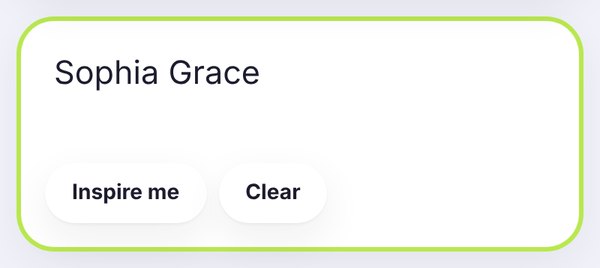
Type a name, a short bio line or a caption in the box. In this example we typed Sophia Grace. The cursive styles update as you type.
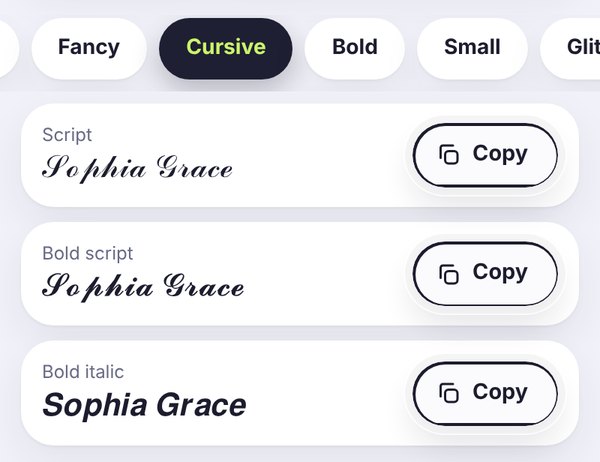
The Cursive tab opens by default on this page. Script is light and elegant, Bold script is thicker and easier to read, and Bold italic is a clean slanted option.
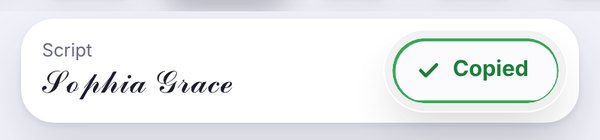
Tap Copy next to the style you like. The button turns green and says Copied, so the cursive text is ready to paste.
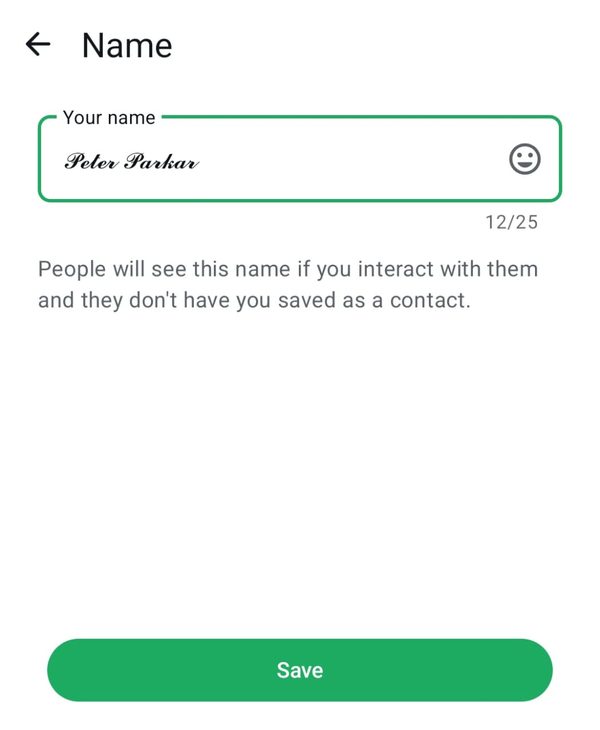
Paste the cursive text into Instagram, WhatsApp, TikTok or any app. This real screenshot shows a bold script name in the WhatsApp Name screen.
Cursive text for bios, captions and names
Our cursive font generator changes plain letters into flowing script and handwriting styles. The Cursive tab shows Script, Bold script and Bold italic, and you can switch to Fancy or Cool if you want a different mood. Everything updates as you type, and one tap on Copy puts the result on your clipboard.
People use cursive text for Instagram bios, wedding and anniversary captions, usernames, love notes, story titles and greeting messages. Because the letters are Unicode characters, they work in apps that do not let you change fonts.
What is a cursive font generator?
A cursive font generator turns normal letters into joined-up, handwriting-style letters that you can copy and paste. Real cursive fonts only change the look of text on your own screen, so they disappear when you send the text to someone else. This tool uses special Unicode characters instead. Each cursive letter is its own symbol, which is why cursive text from FilesSnap keeps its shape in an Instagram bio, a WhatsApp name or a TikTok caption.
Cursive styles explained
Script 𝒮𝒸𝓇𝒾𝓅𝓉 is light and elegant. It looks great for names and short quotes, but it can be thin on small screens.
Bold script 𝓑𝓸𝓵𝓭 𝓼𝓬𝓻𝓲𝓹𝓽 uses thicker strokes. It is the easiest cursive style to read on a phone, so it is the best choice for a profile name.
Bold italic 𝑩𝒐𝒍𝒅 𝒊𝒕𝒂𝒍𝒊𝒄 is not true cursive, but it gives a clean slanted look when script feels too fancy. For more slanted styles, try the italic text generator.
Cursive alphabet: copy any letter
Need a single cursive letter, such as an S in cursive for an initial or a logo idea? Tap any letter below to copy it. The small letter under each one shows the normal version.
Script capital letters
Script small letters
Bold script capital letters
You may notice that a few script letters, such as ℬ, ℰ, ℋ and ℯ, look a little different from the others. Unicode stores them in an older block of symbols, so each phone draws them with a slightly different font. If you want every letter to match, use Bold script.
Where to use cursive text
Instagram: a cursive name or the first line of your bio adds a soft, personal touch. Keep the rest of your bio in normal text so it stays easy to read. See more ideas on Instagram bio fonts.
WhatsApp: cursive works in your profile name, About line and status. Our guide on the WhatsApp cursive name shows a real example.
Captions and messages: wedding and anniversary captions, birthday wishes, love notes and quotes look more special in script.
TikTok, YouTube and Discord: display names and video titles can use cursive, but some usernames and games only accept plain letters.
Tips for readable cursive
Keep cursive to short phrases such as a name or a one-line caption. Long paragraphs in script are tiring to read, and screen readers may skip styled letters, so use plain text for important details like dates and phone numbers.
Frequently asked questions
Is cursive text really a font?
Not quite, and that's actually the good part. A normal font only changes how text looks on your own screen. The cursive here is made of special Unicode characters, so when you paste it somewhere else, it still looks like cursive.
Can I use cursive text on Instagram?
Yes, and it's one of the most popular places to use it. Paste it into your bio, your name, a caption or a comment. If you ever see little empty boxes instead of letters, that phone just doesn't support that style, so try Bold script instead.
Does it work in lowercase and uppercase?
It does. Type capitals and small letters however you like, and both come out in cursive. Numbers usually stay plain, and Hindi text won't change, because the cursive styles only exist for English letters.
How do I write S in cursive?
If you just need it on your phone, tap the S in the cursive alphabet above and paste it wherever you want: 𝒮 for script or 𝓢 for bold script. On paper, a small cursive s starts on the line, goes up to a little point, then curves down and back to close at the bottom. The capital S begins with a small loop at the bottom, rises to the top and sweeps down in one smooth stroke.
Why do some cursive letters look different?
Good eye! A few script letters, like ℬ, ℰ, ℋ and ℯ, come from an older part of Unicode, so your phone draws them with a slightly different font. If you want every letter to match perfectly, go with Bold script.
Is this cursive font generator free?
Completely free. There's no sign-up, no watermark and nothing to install. Everything happens right in your browser, so your text never leaves your device.
How do I write in cursive?
The quick way: type your text in the box at the top, open the Cursive tab and tap Copy next to the style you like. Then paste it anywhere. If you mean on paper, cursive is simply joining the letters of a word together in one flowing line, without lifting your pen after each letter.
How to write cursive by hand?
Start small, literally. Learn the lowercase letters first and get comfortable with three basic moves: the upstroke, the loop and the curve. Then practice joining one letter to the next with a little connecting stroke. Keep the same slant for every letter and go slowly at first. Speed comes on its own.
Can AI read cursive?
Mostly, yes. Today's handwriting recognition apps do a decent job with neat cursive, but they still trip over messy or very loopy writing. The cursive you copy from this page is a different story: it's Unicode text, so computers can read it. Just keep in mind that some screen readers read these letters one by one, so it's best to keep things like phone numbers in normal text.
How to learn cursive?
A little practice every day works better than one long session. Try 10 to 15 minutes a day. Learn letters that share a shape together, such as a, c, d, g and o, and only then move on to capitals. Tracing printed worksheets helps a lot at the start. After that, write your own name and short notes in cursive, and it will soon feel natural.
Popular cursive letters
These are the cursive letters people look for most. Tap a letter in the cursive alphabet above to copy it, or copy it straight from this table. Each row shows the capital and small letter in Script and in Bold script.
| Letter | Script | Bold script |
|---|---|---|
| Cursive a | 𝒜 𝒶 | 𝓐 𝓪 |
| Cursive b | ℬ 𝒷 | 𝓑 𝓫 |
| Cursive f | ℱ 𝒻 | 𝓕 𝓯 |
| Cursive g | 𝒢 ℊ | 𝓖 𝓰 |
| Cursive j | 𝒥 𝒿 | 𝓙 𝓳 |
| Cursive m | ℳ 𝓂 | 𝓜 𝓶 |
| Cursive n | 𝒩 𝓃 | 𝓝 𝓷 |
| Cursive o | 𝒪 ℴ | 𝓞 𝓸 |
| Cursive s | 𝒮 𝓈 | 𝓢 𝓼 |
| Z in cursive | 𝒵 𝓏 | 𝓩 𝔃 |
The cursive s and cursive f are popular for initials, while the cursive g and cursive j have long loops that look elegant in a name. A cursive b, cursive m, cursive n, cursive a and cursive o are useful for monograms and short words. If you are wondering how to write z in cursive, copy 𝒵 or 𝓩 from the table.
Cursive font names
On this page, the cursive font names are the style labels you see on each card: Script, Bold script and Bold italic. They are Unicode text, so a cursive font copy and paste keeps its look in any app. Designers who install real fonts often use cursive font names such as Great Vibes, Dancing Script, Pacifico, Allura and Lobster. Those are font files for design apps, not text you can paste into an Instagram bio, which is why this cursive generator uses Unicode letters instead.
Cute cursive font ideas
For a cute cursive font look, write a short word in Bold script and add a small symbol, for example ♡ 𝓼𝔀𝓮𝓮𝓽 ♡ or ✿ ℒ𝒾𝓁𝓎 ✿. A cursive name with one heart or star looks clean. Too many symbols make the cursive hard to read.
What about Russian cursive?
Russian cursive is the handwritten form of the Cyrillic alphabet that people learn at school. This tool only changes English (Latin) letters A to Z, so Cyrillic letters stay as they are. If you type Russian text, you will see it unchanged. For a cursive font in English, type your text in the box at the top of the page.