Free Instagram Bold Text Generator
Instagram has no bold button, but you can still get a bold bio, name or caption. Type it here, copy it and paste it into Instagram.
Updated October 2026
These styles are Unicode characters, so they keep their look when you paste them. Only English letters (A–Z) and numbers are converted. These styles do not work on Hindi (Devanagari) text.
How to get bold text on Instagram (with screenshots)
These are real screenshots of this page, step by step.
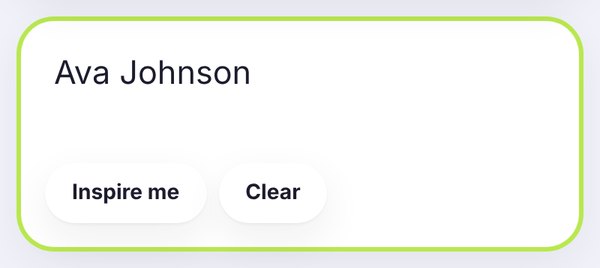
Write what you want in bold. We typed Ava Johnson, the kind of name you might put at the top of a bio.
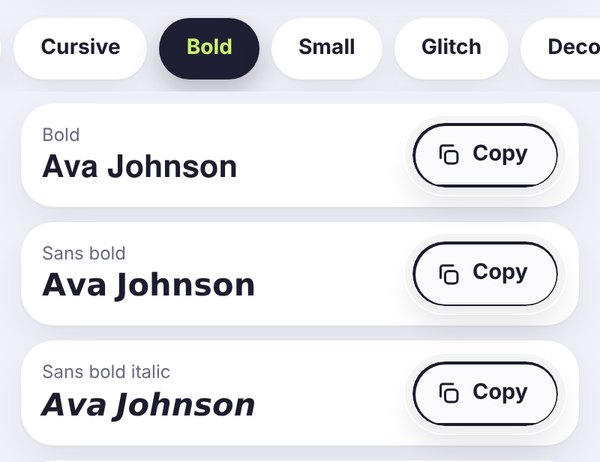
The Bold tab opens by default. Sans bold is the cleanest on a phone screen, while Bold has a more classic look.
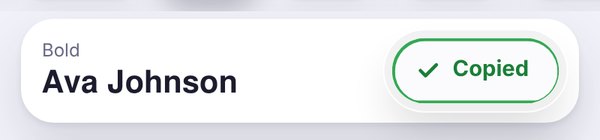
Tap Copy, then open Instagram, go to Edit profile and paste it into your Name or Bio, or straight into a caption.
Can you bold text on Instagram?
Not with a button. Instagram shows everything in its own font, and there's no setting for bold. What you can do is paste bold Unicode letters, like 𝘁𝗵𝗶𝘀. They're real characters, so they stay bold in your bio, name, captions and comments.
The best places to use bold on Instagram
Your name: a bold name looks confident at the top of your profile. Keep in mind that the Name field is used in search, so a fully styled name can be a bit harder to find.
Your bio: bold works best for one line, like what you do or a short headline. Leave the rest in normal text so it's easy to read within the 150-character limit.
Captions: a bold first line is like a headline for your post. It's the first thing people see before they tap more.
Comments: bold one word if you want it to stand out in a busy thread.
You can't use bold in your @username, though. Usernames only allow letters, numbers, periods and underscores.
Bold bio ideas you can try
Here are a few simple patterns that tend to look clean:
- 𝗔𝗩𝗔 𝗝𝗢𝗛𝗡𝗦𝗢𝗡 on the first line, then a plain line about what you do.
- 𝐏𝐡𝐨𝐭𝐨𝐠𝐫𝐚𝐩𝐡𝐞𝐫 · New York · DMs open
- 𝗡𝗘𝗪 𝗗𝗥𝗢𝗣𝗦 𝗘𝗩𝗘𝗥𝗬 𝗙𝗥𝗜𝗗𝗔𝗬 for a shop, with a plain line underneath.
For a softer look, you can mix one bold line with a cursive one from the Instagram bio fonts page. Two styles is plenty.
Bold vs sans bold for Instagram
Sans bold (𝗔𝘃𝗮 𝗝𝗼𝗵𝗻𝘀𝗼𝗻) is the one we'd usually suggest. It's clean, modern and very easy to read on a small screen.
Bold (𝐀𝐯𝐚 𝐉𝐨𝐡𝐧𝐬𝐨𝐧) has small serifs and feels a bit more classic or elegant. It suits brands with a traditional look.
Bold italic (𝑨𝒗𝒂 𝑱𝒐𝒉𝒏𝒔𝒐𝒏) adds a bit of movement. Use it for a short phrase rather than your whole name.
A few things to keep in mind
- Keep your real name or business name in plain text somewhere, so people can find you in search.
- Don't bold your email or phone number. Plain text is easier to copy.
- Check your profile on your own phone after saving. If anything looks like empty boxes, switch to sans bold.
Want to read more? Our step-by-step guide on how to change the font on your Instagram bio covers everything from start to finish.
Bold text for Discord, Facebook and LinkedIn too
Instagram has no bold button, and neither do many other apps. This simple online bold text generator gives you a bold font that you can paste into your bio, and the same bold text works in other apps.
Discord: for chat messages, you can learn how to bold text in Discord in one line: type **your text** with two asterisks on each side. For a bold text Discord name, paste a bold style from this page into the display name field.
Facebook and LinkedIn: use the Facebook bold text generator for posts and comments, and LinkedIn bold text for headlines and the first line of a post. Visit the main simple online bold text generator for every bold style in one place.
Frequently asked questions
Quick answers before you copy.
How do I get bold text in my Instagram bio?
Type your text here, tap Copy next to a bold style, then open Instagram, tap Edit profile and paste it into your Bio. Save, and you're done.
Can I use bold text in my Instagram username?
No. Your @username only accepts letters, numbers, periods and underscores. You can use bold in your Name field and bio instead.
Does bold text work in Instagram captions and comments?
Yes. Paste it like any other text. A bold first line in a caption is a nice way to grab attention.
Will a bold name make me harder to find?
It can. Instagram search may not match bold Unicode letters with normal ones. Keep your real name in plain text in your username or bio to be safe.
Which bold style looks best on Instagram?
Sans bold is usually the cleanest and easiest to read on a phone. Classic bold works well for more traditional or elegant brands.
Is the Instagram bold text generator free?
Yes, it's completely free, with no sign-up and no watermark.