Bold Italic Name for WhatsApp
Heavy and slanted letters give your WhatsApp name energy. Here is how to use bold italic text for your profile name.
If a plain bold name feels too stiff, bold italic is a good middle path. The letters are heavy like bold text, but they lean forward, which makes the name look fast and modern. It is a popular choice for creators, gamers and shop owners who want a name that catches the eye.
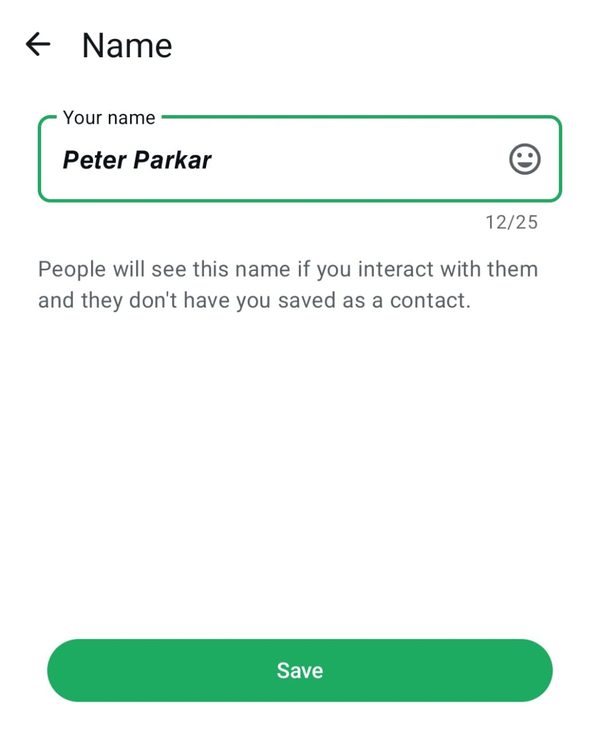
A sans bold italic name in the WhatsApp Name screen. The letters are heavy, slanted and easy to read.
What bold italic looks like on WhatsApp
The screenshot shows the WhatsApp Name screen with a sans bold italic name. The shape is clean and without small strokes, so it stays readable even on a small display.
How to get a bold italic name
- Type your name in the Bold Text Generator.
- Open the card named Sans bold italic in the Bold tab, and tap Copy.
- Open WhatsApp, go to Settings, tap your profile and choose Name.
- Clear the old name, paste the new one and tap Save.
Bold italic or bold?
When bold italic works best
- Short names of one or two words.
- Shop and business names that should look dynamic.
- Creator profiles that already use a modern look.
Things to watch
Bold italic is a special style, so very old phones may show boxes instead of letters. Test it by asking a friend to look at your profile. Avoid very long names, because slanted letters become harder to read when there are many of them. Keep emojis and symbols to a minimum, so the style of the letters remains the main feature.
Related WhatsApp name styles
See the bold name and the cursive name guides if you want a different mood.
Bold text for Discord, Facebook and LinkedIn
Bold italic is one style from a simple online bold text generator. If you like it on WhatsApp, the same bold font and plain bold text also work in other apps.
Discord. Wondering how to bold text in Discord? In chat, wrap words in two asterisks for bold (**hi**) or three for bold italic (***hi***). For a bold text Discord display name, copy a Unicode style instead.
Facebook and LinkedIn. Try the Facebook bold text generator for posts and LinkedIn bold text for headlines. For more styles, open the main simple online bold text generator.
Frequently asked questions
Quick answers about this WhatsApp name style.
How do I get a bold italic name on WhatsApp?
Use the Sans bold italic card in the Bold tab of the generator, copy it and paste it into the WhatsApp Name field.
Is bold italic different from italic?
Yes. Italic is slanted only. Bold italic is slanted and heavy.
Does bold italic count more characters?
No. In the screenshot the counter stays at 12 out of 25, the same as normal letters.
Will it work on iPhone and Android?
Usually yes. Very old devices may show boxes, so test it first.
Is it free?
Yes, with no sign-up and no watermark.