How to Write a Bold Name on WhatsApp
A bold profile name is the easiest way to make your WhatsApp name stand out. Here is how to do it in under a minute, with a real screenshot.
Your WhatsApp name is the first thing that people see when you message them and they have not saved your number. A bold name looks stronger and is easier to notice in a long chat list. WhatsApp does not give you a bold button for the profile name, but you can still get bold letters by pasting special Unicode text. This guide shows how, using a screenshot from a real phone.
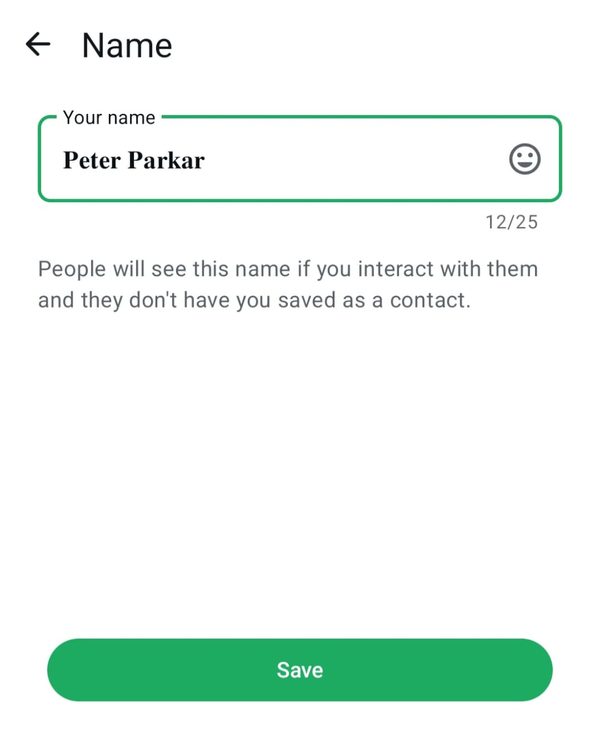
A serif bold name in the WhatsApp Name screen. The counter shows 12/25, so the styled letters use the same space as normal ones.
What a bold WhatsApp name looks like
The picture below shows the Name screen in WhatsApp. The example name is written in serif bold, a classic heavy style. Notice that WhatsApp accepts it without any warning, and the counter still reads 12 out of 25.
How to make a bold name on WhatsApp
- Type your name in the Bold Text Generator.
- Open the card named Bold in the Bold tab, and tap Copy.
- Open WhatsApp, go to Settings, tap your profile and choose Name.
- Clear the old name, paste the new one and tap Save.
Which bold style should you choose?
Bold name tips
- Keep your name short, so the bold letters stay readable.
- Do not add many symbols. One clean bold name looks better than a decorated one.
- After saving, ask a friend to check how it looks on their phone. If they see boxes, choose Sans bold instead. Our guide on why fonts show empty boxes explains the cause.
- Do not copy the name of a brand or a famous person. Impersonation can lead to a ban.
Bold name or WhatsApp bold formatting?
WhatsApp has its own bold formatting for chat messages: put asterisks on both sides of a word, like *hello*. That works inside messages, but not in the profile name field. For the name, you need the Unicode method shown above. You can read more in fancy text for WhatsApp.
Bold text beyond WhatsApp: Discord, Facebook and LinkedIn
The bold name in the screenshot above was made with a simple online bold text generator. The same bold font can be pasted into other apps, not only WhatsApp.
Discord. For chat, here is how to bold text in Discord: put **two asterisks** on each side of the words. For a bold text Discord display name, paste a Unicode bold style instead, because name fields ignore Markdown.
Facebook and LinkedIn. Use the Facebook bold text generator for posts and comments, and LinkedIn bold text for a headline or the first line of a post. The main simple online bold text generator has every style in one place.
Frequently asked questions
Quick answers about this WhatsApp name style.
How do I write a bold name on WhatsApp?
Type your name in the bold text generator, copy a bold style, then paste it into Settings, your profile, Name, and save.
What is the WhatsApp name limit?
The screenshot shows a limit of 25 characters for the profile name.
Will my contacts see the bold name?
Yes. People who have not saved you as a contact see your profile name, and the bold letters appear there.
Why do I see boxes instead of bold letters?
Some older phones do not support every style. Try Sans bold or Bold, or update your phone.
Is it free?
Yes. The generator is free, with no sign-up and no watermark.